THINKING, CAPTURED
Catch the thought before it fades. A voice journal you keep while walking.
Talk while you walk, and the day’s thinking becomes Markdown files. No API key, no account. The files open in Obsidian and read straight into Claude Code.
Why record it
Your AI wasn’t on the walk with you.
Models got smarter; the context you can hand them didn’t keep up. The idea you had on a walk, the point you never made in the meeting, the half-formed thought before sleep — whatever never became a file never becomes context.
The constraint when thinking with AI isn’t model intelligence — it’s how much of your head actually made it into text. Ayumi is a capture tool for everything that leaks away.
Personal AI can now read your email and photos. Those record what happened — not what you thought about it. Ayumi keeps that context for personal AI, in files you own.
How it works
What happens when you talk
Speak
Start from the Action Button, the Lock Screen, Apple Watch, or a Shortcut. Keeps recording locked, in your pocket.
It becomes text
Transcribed on-device. Audio never leaves your phone; works in airplane mode.
It stays
As Markdown in the folder you chose, with the weather and place attached.
Where files go
Nothing to export.
Ayumi writes plain Markdown on your own disk. No private cloud, no proprietary format, no export ritual. In the app you write in Rich Text with the symbols hidden, so you never need to know Markdown.
---
created_at: "2026-09-01T10:02:05+09:00"
weather_summary: "Sunny"
location_place_name: "Shibuya, Tokyo"
transcription_model: "apple-on-device"
---

Thinking about the move

Kept thinking about whether to move while I walked.
Rent goes up a little, but being closer to the
station is an everyday thing. I'll walk that
neighborhood once this weekend, then decide.
Obsidian
Point Ayumi at a folder inside your vault and today’s entry links like any other note, today.
Claude Code / Cowork
Give it your journal folder and last month’s you becomes context. Weekly reviews on request.
grep · git · anything
It’s just text. It will open in whatever editor exists in ten years.
Getting started
Your first recording is your first entry.
There is no signup screen.
- No API key
- No account
- Works offline
- Audio never leaves the device
Want more than a transcript later? Add your own key — Gemini, Muse, Grok, or Groq Whisper — to summarize and reshape recordings. It can wait.
Recording
Start from almost anywhere.
- Lock Screen · Control Center · Action Button — One press to record, or a Back Tap
- Background recording while locked — Keep walking, keep talking
- Stop from the Dynamic Island — Never unlock at all
- Apple Watch standalone recording — Even without your iPhone
- External mics preferred automatically — DJI Mic, AirPods, whatever’s on
- Weather and location attached — Find it later by that day, that place
Apple Watch
Leave your iPhone in your pocket.
For the thought that isn’t worth taking your phone out for. One tap starts recording, and the waveform moves with your voice. Stop, and it goes to your iPhone to be transcribed into an entry like any other.
- Tap, or ask SiriSay “Start recording in Ayumi.” Stopping works by voice too.
- Lower your wrist, keep talkingThe recording carries on when the screen goes dark.
- No iPhone nearby? Fine.Recordings wait on the watch and sync when it reconnects — stamped with when and where you spoke.
- One tap from the watch faceA complication opens the recorder and shows how much you’ve written today.
- Live comments on your wristAI personas reply briefly while you talk. Your own Gemini key, on only when you want it.
- You keep every word, not a summaryThe audio and the full transcript stay as your own Markdown.
Using Ayumi on Apple Watch → · How it differs from Siri Recap →
Siri
Ask Siri what you wrote.
On iOS 27 or later, Siri can find and open your Ayumi entries and answer questions about what you wrote. After talking something through with Siri, say “Save this to Ayumi” and it becomes a new entry.
- “Open the entry about the trip to Kyoto in Ayumi.”
- “In Ayumi, what did I write about Mom last week?”
- “Save this to Ayumi.”
Siri reads your journal only after you turn it on in Settings. Turn it off and your entries leave search. Saving works either way.
Five-year diary
What did you say on this day last year?
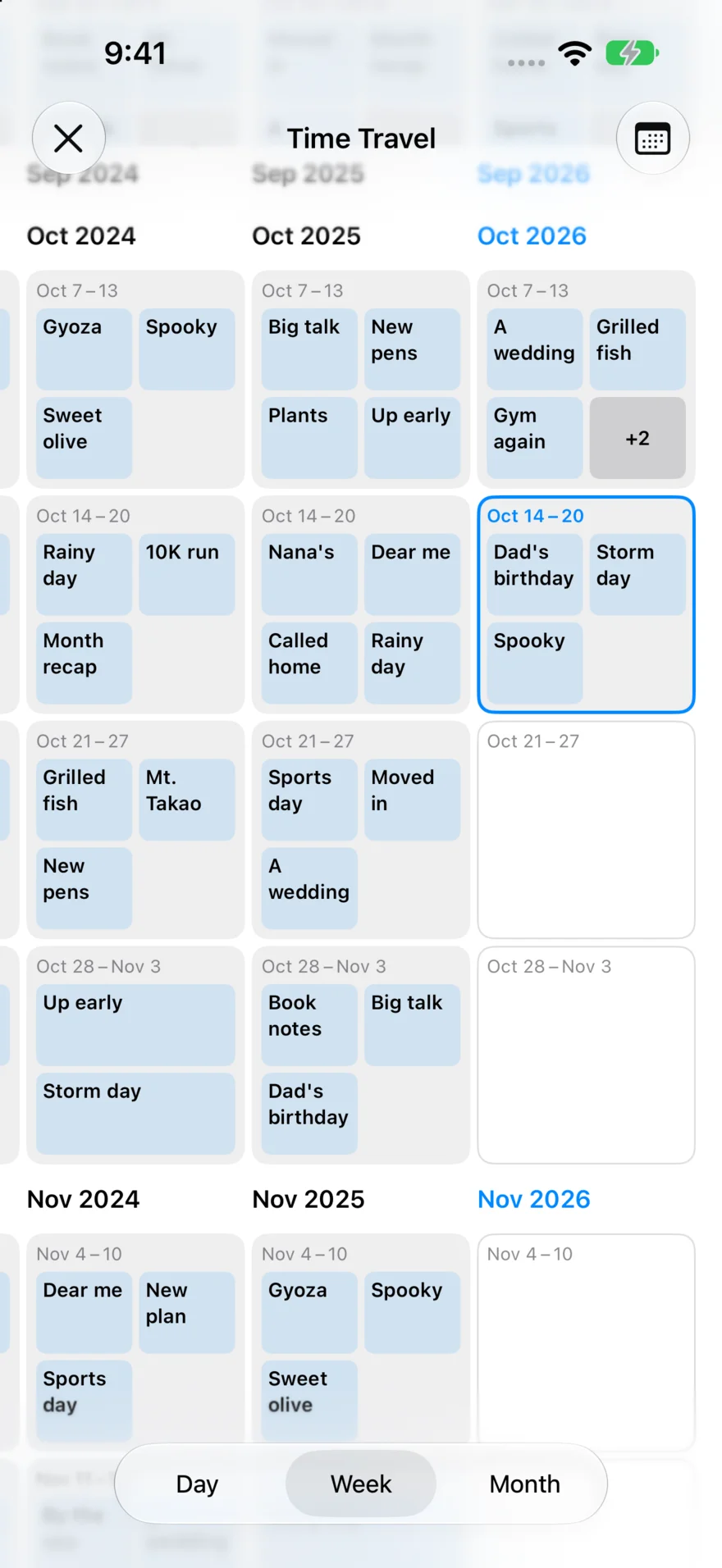
Time Travel lays your journal out like a five-year diary: one column per year, with the same dates lined up in a row. Read across to see what you said on this day last year, and the year before — a line-a-day journal you keep by voice.
Time Travel
Compare the years side by side by day, week or month. On iPhone, iPad and Mac.
On This Day
On iPad and iPhone Duo, entries from the same date in past years sit beside the one you’re writing.
Import Media
Pick several videos, photos and recordings, and they become one entry — even for a day you only took pictures.
How it compares
For people who want to keep their own files
| Where your data lives | Price | What the AI does | |
|---|---|---|---|
| Cloud voice notes | The vendor’s servers | Monthly subscription | Summarizes and rewrites for you |
| Journal apps | In-app store | Yearly plans | Insights stay inside the app |
| Ayumi | Your disk | Free | Only when you say so — on-device, or with your own key |
If you want everything interpreted for you, cloud tools make that easier. If you want the files in your hands, and the say over whether — and which — AI reads them, that’s Ayumi.
Use cases
Where it fits in your day
Walks become thinking time
Talk on the walk, sort it out at home. Commutes and strolls turn into working hours for your head.
Prep for thinking with AI
Let Claude read the day’s captures in the evening and pick up where you left off — no re-explaining yourself.
Daily notes, by voice
Your day, spoken, becomes Markdown entries with weather and place attached. The folder works as an Obsidian vault too.
Thirty seconds before you forget
Right after a meeting, the moment an idea lands — talk for thirty seconds. Search will find it later.
Every feature is free.
No subscription. Ayumi runs no servers, so more users don’t cost more to keep — which is why it can stay free.
FAQ
Common questions
Why does it require iOS 26 / macOS 26?
On-device transcription uses the new speech engine introduced in iOS 26. The older engine can’t handle long recordings, and long walking monologues are the whole point of Ayumi.
Which languages are supported?
On-device transcription follows your device language and covers the major languages, including Japanese and English. The language model downloads once, then works offline.
Can I point it at my Obsidian vault directly?
Yes. Choose a folder inside your vault as the journal folder and entries are part of the vault from the moment they’re written. No migration, no export.
What does adding a cloud engine change?
The on-device engine writes what you said, verbatim. With your own key, the same recording can go to Gemini, Meta Muse, xAI Grok, or Groq Whisper instead — and on Gemini it can be summarized, cleaned up, or reshaped by prompt. Gemini listens to the audio itself, not a transcript, so it can also note what never became words — that you were walking, that it was raining, that someone called out to you. Any past recording can be re-run through another engine.
Is the audio itself kept?
Yes. Recordings are stored as attachments next to the Markdown, so you can re-listen or re-transcribe any time.
Will the AI reinterpret what I said?
Not unless you ask it to. The default on-device transcription writes down what you said, word for word. Reshaping with Gemini, and Live — personas commenting while you record — only run when you’ve added your own key and turned them on. Live comments are kept apart from the journal; the entry holds your words.
Try it on your next walk.
Free · No account · No setup · iPhone / iPad / Mac / Watch